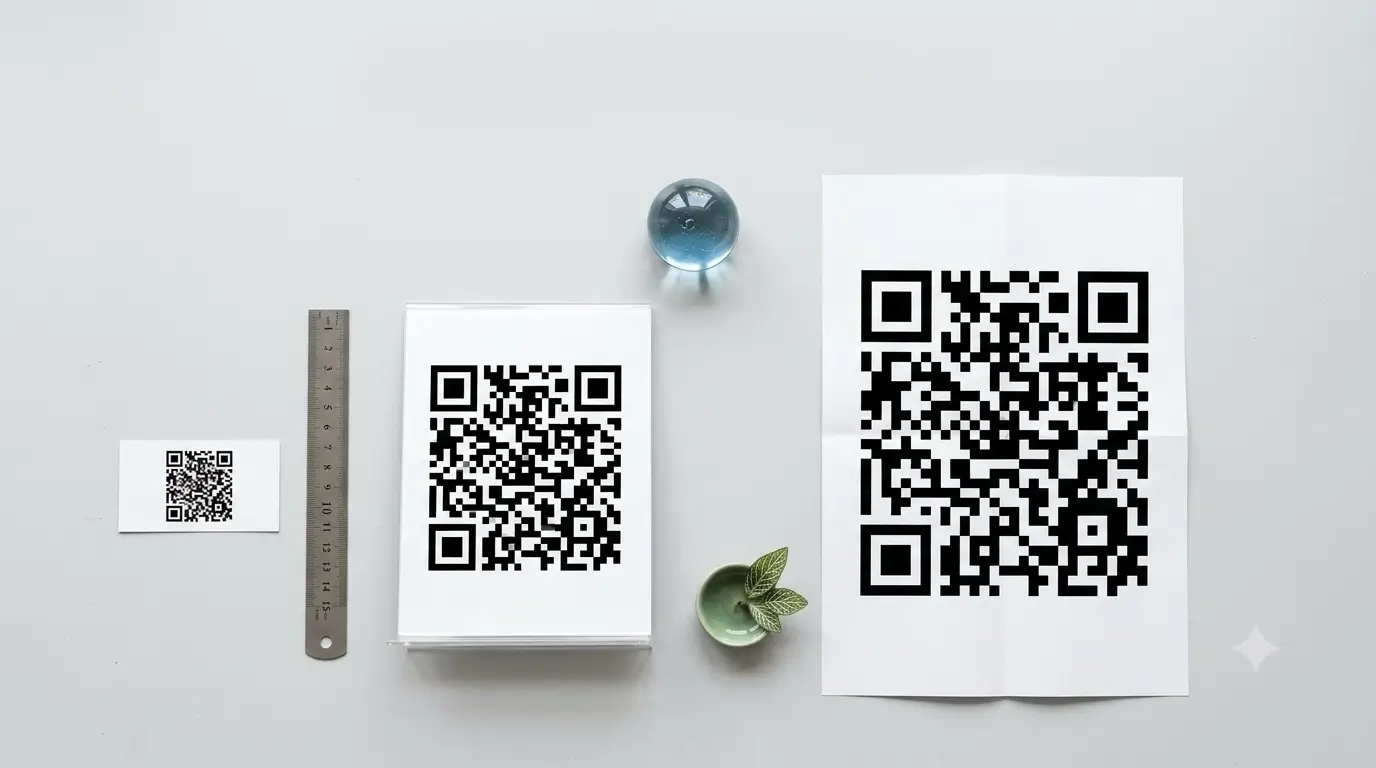

QR code size means two different things: how many modules the code contains, and how big it is printed. A standard QR code ranges from 21x21 modules up to 177x177. For print, the practical minimum is about 2 x 2 cm, and the working rule is that the code should be roughly one tenth of the distance it will be scanned from.
Confusing those two meanings is why codes fail. A code can be the correct QR code size in modules and still be unscannable because it was printed too small, or printed large but from a file that was never sharp enough. Below are both sides, with the numbers that matter.
What does QR code size actually mean?
The term QR code dimension usually refers to the module grid: the number of small black and white squares along each side. That grid is fixed by the QR standard and grows in steps called versions. Version 1 is 21x21 modules, and each version adds four modules per side, so Version 2 is 25x25, Version 3 is 29x29, and so on.
Physical size is separate. The same 25x25 code can be printed at 1 cm or at 1 metre. More data forces a higher version, which means more modules packed into whatever physical space you give it, which means each module gets smaller and harder for a camera to resolve. This is why a long URL often needs a physically larger printed code than a short one.
What is the smallest QR code?
The smallest QR code in the standard specification is Version 1 at 21x21 modules, which holds around 25 alphanumeric characters at the highest error correction level. Below that sits a separate format called Micro QR, whose smallest form (M1) is 11x11 modules and stores only a handful of digits.
Micro QR is designed for tight spaces such as component labels, and it needs a smaller quiet zone than a standard code. It is not a good choice for anything a customer scans with a phone, because support is less consistent across camera apps.
What is the biggest QR code?
The biggest QR code in the standard is Version 40 at 177x177 modules. At the lowest error correction level it can hold roughly 7,089 digits, 4,296 alphanumeric characters, or 2,953 bytes. That is the ceiling for how much data a single QR code can carry.
There is no QR code max size in centimetres or metres. A code can be painted across a building wall and still scan, as long as the camera can see the whole code with its quiet zone intact and the scanner is far enough back. In practice the limit is the phone camera, not the standard.
Very high versions are rarely a good idea for anything scanned casually. A dense 177x177 grid printed at business-card scale gives modules so small that most phone cameras will fail. Keep the encoded data short and let the version stay low.
What is the minimum size for a QR code?
The minimum size for a QR code in print is about 2 x 2 cm. That is a practical floor rather than a rule in the standard — below roughly 2 cm most phone cameras start failing, because each module becomes too small to resolve cleanly. Note that this is a different question from the smallest QR code in the specification, which is measured in modules rather than centimetres.
Three things push that minimum upward. A longer URL raises the version, so more modules have to fit into the same square. A logo in the middle eats into the error correction budget. And a low-contrast or textured background makes the edges harder to read. With a short link, plain black on white and a clean quiet zone, 2 cm holds up; with any of those three working against you, go to 2.5 cm or more.
What size should a QR code be for printing?
Use the 10:1 rule: the printed code should be about one tenth of the distance it will be scanned from. A code read from 30 cm away needs roughly 3 cm. A poster read from 3 metres needs roughly 30 cm. Then check it against the practical floor of 2 x 2 cm, below which most phones struggle regardless of distance.
- Business card or product label: 1.5 to 2 cm, with a short URL.
- Counter standee or table tent: 2.5 to 4 cm. On a card that also carries an NFC chip, the "no supported app" message is a tag-format issue, not a size one.
- Wall poster or shop shutter: 15 to 30 cm.
- Hoarding or vehicle wrap: 50 cm and up, sized to the viewing distance.
Always leave the quiet zone: a clear margin of at least four modules on all four sides, with nothing printed inside it. Trapping a code between text or running it to the edge of a sticker breaks scanning more often than small size does.
Can a QR code be rectangular?
Yes, but not the ordinary kind. A standard QR code is always square. A rectangular QR code exists as a separate format called rMQR, standardised as ISO/IEC 23941, which packs the same idea into a wide, short shape for narrow surfaces such as cables, pens and slim packaging.
Before choosing a rectangle QR code, test it on the phones your customers actually use. Reader support is far narrower than for the standard square format, and a code that only some cameras recognise is worse than a smaller square one that everybody can scan. Stretching a normal square code into a rectangle in a design tool does not work at all: it distorts the module grid and the code stops scanning.
Why does a low resolution QR code fail to scan?
A low resolution QR code fails because the edges between modules turn blurry, and the scanner can no longer tell one square from the next. This usually happens when a small PNG is enlarged to fill a bigger space, when a code is screenshotted and re-saved several times, or when it is compressed heavily for the web. If the code you are fighting is already inside a photo or screenshot, our guide to scanning a QR code from an image covers every reading method.
Download an SVG whenever the generator offers one, because vector files stay sharp at any size. If only PNG is available, export at the largest resolution offered and print at 300 DPI or higher. Keep the code plain black on white: low contrast, gradients and a logo dropped into the middle all eat into the error correction budget.
QR code size on a business card
A standard Indian business card is 3.5 x 2 inches, which leaves room for a code of roughly 1.5 to 2 cm without crowding the layout. The usual mistake is encoding a long profile URL, which pushes the version up and shrinks every module. Keep the link short. Our guide to standard business card dimensions covers the surrounding layout, and the visiting card background guide covers keeping that design from swallowing the code.
Printing a code onto paper also fixes it permanently: change your number or your role and the whole batch is wasted. A QR business card from ProfileTap keeps the printed code the same while the profile behind it stays editable, so sizing is a one-time decision rather than a reprint every time something changes.