

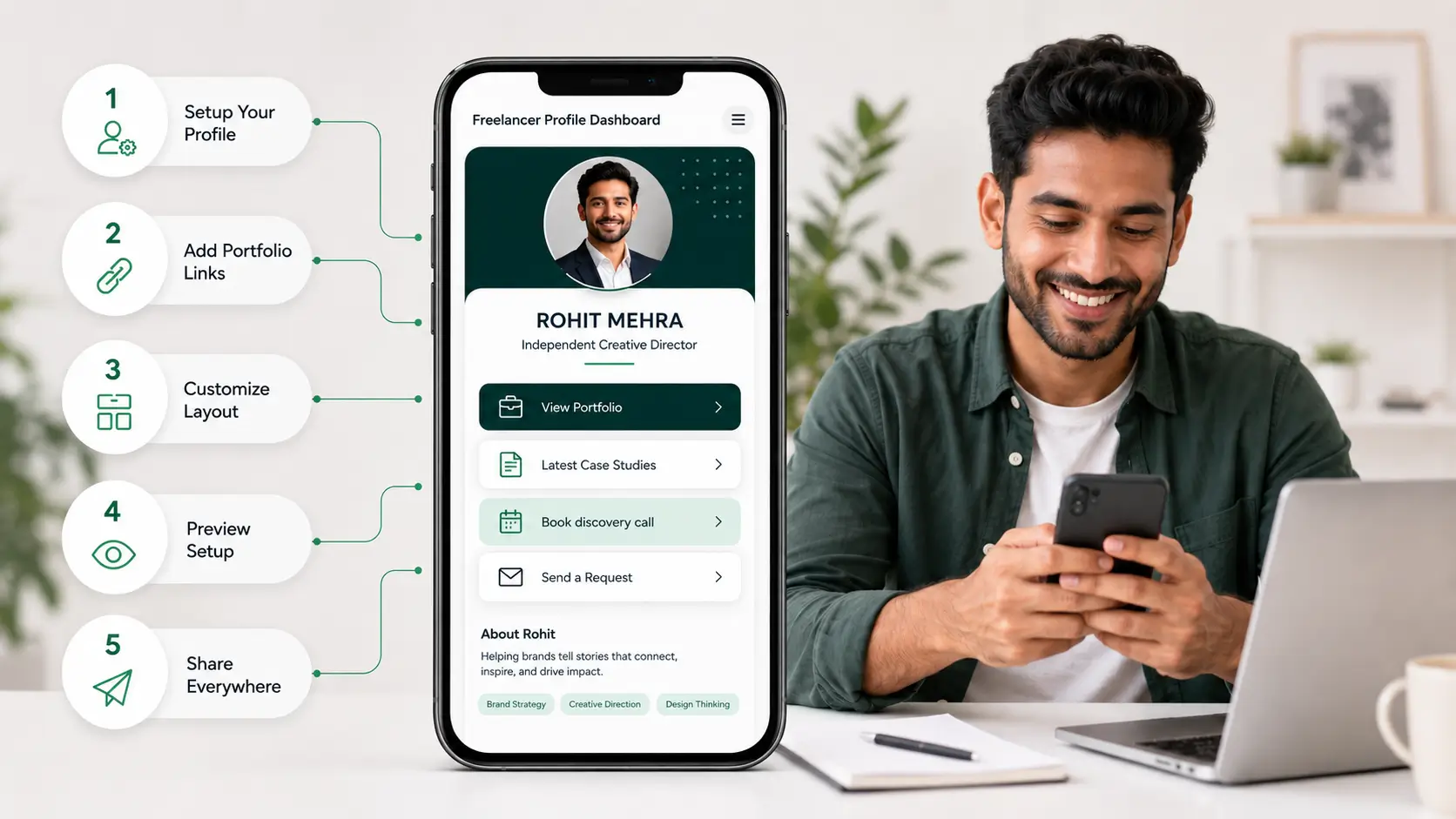
Here is how freelancers use digital visiting cards to win clients: they share one live profile, portfolio, rates, case studies, testimonials and a direct contact button, with a tap or a scan, then update it per pitch without reprinting. A designer drops it in a proposal DM, a consultant taps it at a meetup, and the same link sits on every deck and invoice. Whether you call it a freelancer business card or simply your profile link, the same page does both jobs. This is the day-to-day version, from the first pitch to the follow-up.
Who this is for
You are an independent professional, a designer, developer, writer, consultant or photographer, and your next contract often depends on the first impression you leave behind. On Monday you are pitching web design to a startup founder; by Wednesday you are presenting content metrics to an e-commerce brand. You wear more than one hat in a week, and a printed card can only ever show one.
You meet people in co-working cafes, at agency mixers and on Zoom calls, and a lot of your warm leads arrive through Instagram or LinkedIn. What you need is one place that holds your work, your rates and a way to reach you, that you can hand over in any of those settings in under five seconds.
The problem
What this actually costs
- A paper card handed over at an event is typed into a phone later, if at all; most never are, and the lead goes cold.
- Every change to your services, rates or number makes the box of cards in your bag out of date.
- Your portfolio lives on Behance, GitHub or Dribbble; a prospect has to type a sub-domain by hand to find it.
- You have no idea which of the twelve people you met actually looked at your work afterwards.
The card goes stale the moment you change anything
Unlike a salaried professional with a single fixed role, a freelancer's offer shifts month to month. A physical card cannot reflect that. Reprinting every time you add a service or drop a number is wasted money, so most freelancers carry cards that are quietly wrong.
The portfolio is three taps too far away
The work is what sells you, and it sits on a different site from your contact details. Expecting a high-value prospect to type a complex portfolio URL into their phone during a conversation is where most introductions lose momentum.
Follow-up is guesswork
After a meetup you have a stack of names and no signal about who was interested. You either message everyone, which reads as spam, or nobody, which wastes the evening.
The fix
What changes on day one
- One live profile holds your portfolio links, services, rates page, testimonials and a save-contact button.
- You share it by NFC tap in person, QR on a slide, or link in a DM; the other person needs no app.
- You edit it from your phone before each pitch, and every card, QR and link already out there shows the new version.
- Views and link clicks are recorded, so you know who to follow up with.
Tap
In person, an NFC card opens your profile on the other person's phone in about two seconds, a premium touchpoint at a co-working cafe or a conference. On a video call, the QR on your final slide lets clients pull your details onto their phone without disrupting the conversation. On Instagram or LinkedIn, the same profile works as your link-in-bio, so warm inbound traffic lands on a consolidated page rather than a cluttered site. If you are starting from nothing, the digital business card for freelancers page sets it up in minutes.
Capture
The profile carries a freelance portfolio link to Behance, GitHub, Dribbble or your own domain, so sharing your work is one tap instead of a typed URL. A payment link or UPI link on the same page lets you take a retainer deposit while interest is high, at the table rather than three emails later. A scheduling link lets a lead book a discovery call while they are still looking at your profile.
Follow up
Each tap, scan and link click leaves a trace on your dashboard. A spike in portfolio clicks the evening after a regional meetup tells you exactly which leads are warm, so your follow-up message goes to the three people who looked, not the twelve who did not.
Old way vs new way
Sharing a live profile
- Portfolio, rates and contact on one page, updated before each pitch
- Shared by tap, QR or link; no app on the other side
- Views and clicks show who engaged
- Deposit and discovery call bookable on the spot
Handing over a printed card
- Details fixed at print time; a new rate or number means a reprint
- Portfolio reached by typing a URL later, if at all
- No signal about who was interested
- Payment and booking happen in a separate thread days later
What you get
A profile you edit between pitches
Swap the featured case study, rewrite the service bio or change the number from your phone, and it is live everywhere at once. The trade-off against print is laid out in paper vs digital business cards.
Three ways to share the same page
NFC for in-person, QR for slides and print, link for chat and bio. Which of tap or scan suits your week is covered in NFC business card vs QR code.
Engagement you can act on
Profile views and link clicks by day, so a Thursday meetup shows up as a Thursday-night spike and your follow-up list writes itself.
Results
| Measure | Before | After |
|---|---|---|
| Time for a prospect to reach your portfolio | Type a URL from a card, later | One tap or scan, in the room |
| Updating rates or services | Reprint the box | Edit the profile from your phone |
| Knowing who engaged after an event | Guesswork | Views and clicks on the dashboard |
| Taking a retainer deposit | Separate email thread | Payment link on the profile |
| Booking a discovery call | Back-and-forth on availability | Scheduling link on the profile |
Representative scenario: a designer meets twelve people at a weekend meetup. With printed cards, follow-up means twelve identical messages on Monday and no idea who looked. With the profile, the dashboard shows four portfolio clicks on Saturday night; those four get a specific message on Sunday, and the other eight get a light touch a week later. Same evening, same twelve people, a very different Monday.
The headline: your card stops being a piece of paper that goes stale and becomes the page every pitch, deck and DM already points at.
What to watch for
Three honest limitations
- In traditional trade settings and older business circles, offering a printed card is still a courtesy; many freelancers carry both.
- Analytics tell you who looked, not who will hire you. The follow-up message still has to be good.
- A profile is only as current as you keep it. Set a monthly reminder to check rates, featured work and the number.
Summary
Background and goals. Freelancers change what they offer week to week, meet prospects in person and online, and need the work itself to be one tap away.
Solution. One live profile shared by NFC tap, QR or link, carrying portfolio, rates, a contact button, a payment link and a scheduling link, edited from the phone before each pitch.
Results. The portfolio reaches the prospect in the room, nothing goes stale, and the dashboard turns a stack of names into a short, warm follow-up list.
Try it at your next pitch
Moving your card online is the simplest upgrade an independent professional can make this year. Create your free digital business card, put the link in your next proposal, and add an NFC card when you are ready for the in-person tap.