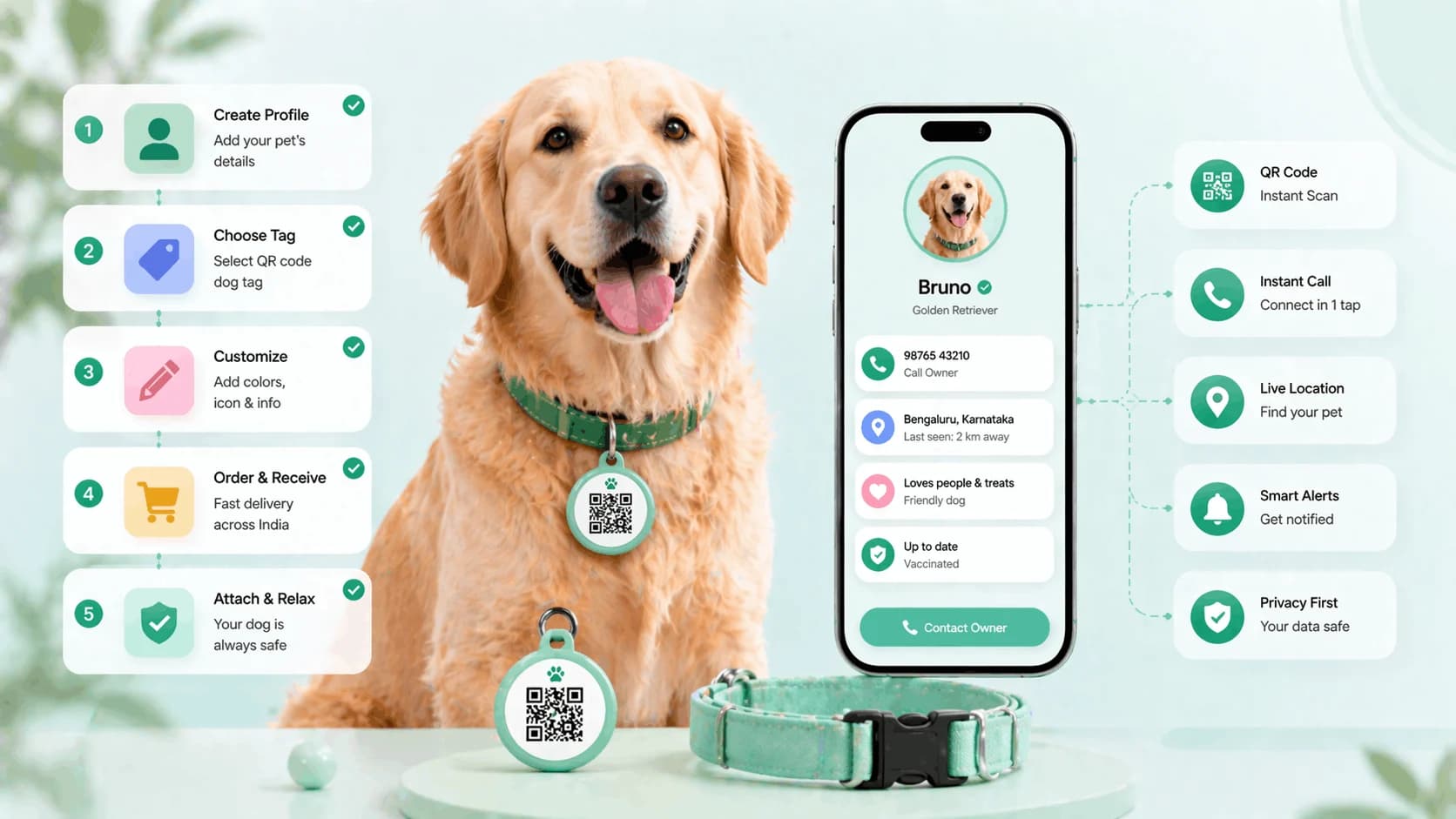
To make a dog ID tag with a QR code, you create a digital pet profile, generate its QR code, and print or attach that code to your dog's collar or tag. No engraving and no technical skills needed. Any smartphone can scan it to see your dog's name, your contact number and vet details, and when your number changes you edit the profile instead of buying a new tag. Here is how to make a dog ID tag with QR code in six steps, plus where to print and attach the code.
TL;DR
- The whole setup takes under 15 minutes on a phone.
- The QR code stays the same forever; only the profile behind it changes.
- A finder needs no app, only a phone camera and internet.
- Test the scan yourself before the collar goes back on the dog.
Before you start
A QR dog tag links a scannable code on your dog's collar to a full digital pet ID profile: your dog's name, photo, breed, your contact number, vet details and medical notes. You do not need design software, a printer necessarily, or any technical knowledge. Have a recent, front-facing photo of your dog ready and decide on a backup contact before you begin; those two things take longer than the setup itself.
What you need
- Your phone, or any device with internet access.
- A ProfileTap account; creating one is free.
- A way to attach the QR code to the collar: a printed tag, a sticker, a tag holder or a ready-made tag. Options in Step 6.
Step 1: Create your account and a pet profile
Sign up to ProfileTap with an email address or phone number; it takes about two minutes. From the dashboard select Create Profile and choose Pet as the profile type, which sets up the right layout for a dog's information rather than a person's.
Step 2: Add your dog's name, photo and breed
Give the profile your dog's name as it appears on the tag, plus any nickname they respond to. Upload a clear, recent photo, ideally a front-facing shot in good light that shows the face and colouring. Add the breed, age and any distinctive markings, such as a white patch on the chest or black ear tips. These details are how a finder confirms the dog they have found is yours.
Step 3: Add your contact information
Add your primary phone number and a backup contact, a family member or neighbour who can be reached if you are unavailable. You choose which contact options appear on the profile; for a tag that might be scanned by several strangers during a search, a WhatsApp button is the fastest way for a finder in India to reach you.
The step people get wrong
Only adding one number. Dogs go missing when the owner is travelling, in a meeting, or on a dead battery. The backup contact is what gets the call answered; without it the finder is left holding a dog and a tag that rings out.
Step 4: Add vet and medical information
Add your vet's name and clinic number, then any note that helps a finder make good decisions: allergies, current medication, conditions like epilepsy or diabetes, and behaviour ("friendly but anxious around children"). There is no character limit. If you have more than one pet, each animal gets its own profile and its own QR code under the same account.
Step 5: Generate and download the QR code
Once the profile is complete, go to Share Profile and select QR Code. ProfileTap generates a unique dog ID tag QR code for that profile; download the image at the largest size offered so it stays sharp when printed small.
Step 6: Print and attach it to the collar
Now get the code onto something that survives a dog. Wherever you attach it, make sure the code faces outward from the collar and test the scan yourself before putting the collar back on.
| Option | How | Durability | Best for |
|---|---|---|---|
| Ready-made QR tag | Order a tag already linked to a profile and clip it on | High | Anyone who wants it done today |
| Custom printed tag | Pet stores in major cities or online sellers print your QR onto metal or acrylic | High | Larger dogs and rough play |
| Weatherproof sticker | Print on waterproof sticker paper, cut to size, stick on an existing tag with a clear laminate on top | Medium | Fastest home option |
| Laminated paper card | Print on paper, laminate at any print shop, punch a hole for the collar ring | Low to medium | A stopgap until a tag arrives |
| Clear tag holder | Slide a printed card into a plastic holder on the collar ring | Medium | Easy to replace the card later |
QR tag versus an engraved tag
| QR code dog tag | Engraved metal tag | |
|---|---|---|
| Number changes | Edit the profile; same tag | New tag, new engraving |
| Information it carries | Photo, vet, medical notes, backup contact, WhatsApp | One or two lines |
| Works without a phone | No; the finder needs a camera and internet | Yes |
| Finder needs an app | No | No |
| Readable when scratched | Partial; QR codes tolerate some damage, then fail | Partial; engraving wears but stays readable longer |
Honest comparison
Where a QR dog tag is the better choice
- Your number, address or vet is likely to change in the dog's lifetime
- You want the finder to see a photo and medical notes, not just a number
- You have more than one pet and want one place to manage all their details
- You want a WhatsApp button so a finder can message rather than call a stranger
Where to keep an engraved tag alongside it
- Areas with no mobile signal, where an engraved number is still the only thing that works
- A dog that chews or loses tags weekly; a home-printed sticker will not last and a metal tag is the better carrier
- Anyone who will not keep the profile updated; a stale profile is no better than a stale engraving
Common mistakes
Four things that stop the tag working when it matters
- Printing the code too small or too close to the tag edge, so phones cannot lock on. Keep it at least 2 cm square with a white margin.
- Attaching the code facing the fur. It has to face out.
- Never test-scanning it. One scan on your own phone before the collar goes on catches every printing mistake.
- Forgetting the profile exists. Put a reminder to re-check it whenever you change a number or move house.
What to include on the profile
| Section | Include |
|---|---|
| Identification | Name and nickname, breed, age, weight, colour and markings, a clear front-facing photo |
| Owner contact | Primary phone, backup contact name and number, WhatsApp number, general neighbourhood |
| Veterinary | Vet name and clinic contact, microchip number if any, last vaccination date |
| Medical | Allergies, current medication and dosage, conditions, behaviour notes, dietary restrictions |
The more you include, the better equipped any finder, or any vet who takes your dog in, will be. This is where a QR tag outperforms engraving: when your number changes, you move house, or your dog develops a new condition, you update the profile the way you would update a contact in your phone, and the tag on the collar stays exactly the same.
You're done
That is the whole job to make dog ID tag setups that never go out of date: fifteen minutes, zero re-engraving. If you would rather skip the printing, the Pet QR Tag ships already linked to a recovery-focused profile that puts your contact details front and centre for the "I found this dog" moment. For the wider picture, see the best pet ID solutions in India and lost pet prevention with QR tags.