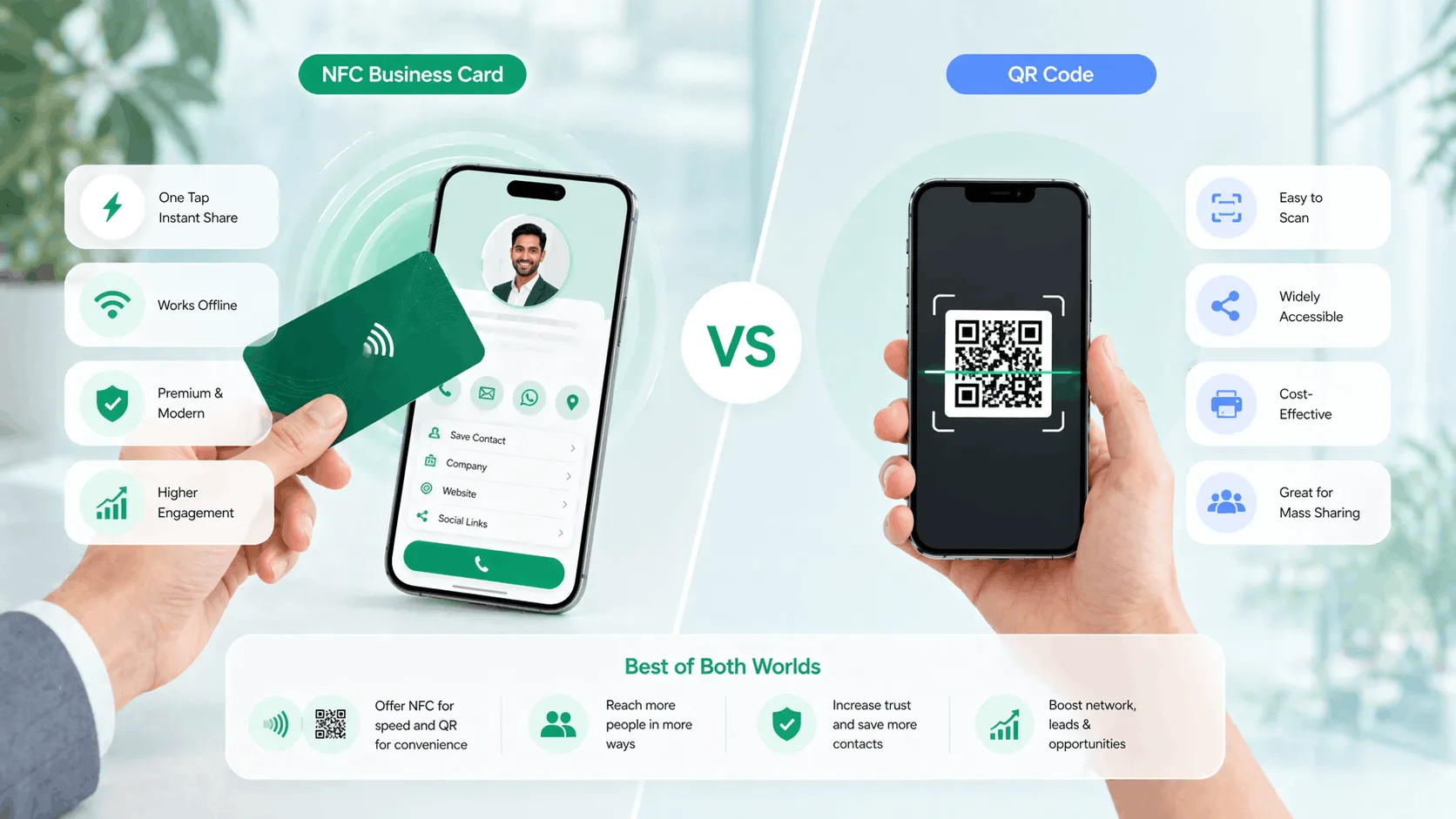

When professionals switch from paper cards, the first real question is always the same: should I get an NFC card or go with a QR code? Both are digital. Both share your contact instantly. But they work differently, and the right choice depends on your context - not just what sounds more impressive. If you're exploring an NFC business card in India, here's the honest comparison you need before deciding.
This NFC business card vs QR code comparison breaks down both options honestly, so you can pick the right one for how you actually network.
What Is an NFC Business Card?
NFC stands for Near Field Communication - the same technology that powers contactless payments on your phone. An NFC business card is a physical card embedded with a chip that, when tapped against an NFC-enabled smartphone, instantly opens a digital profile in the recipient's browser. Comparing it against an ordinary printed card instead? NFC card vs visiting card sets the two side by side.
No app required. No scanning. No typing. The recipient just taps your card against their phone and your full digital profile - name, designation, contact details, social links, and more - appears on their screen in under two seconds. Which card body to choose is the next question — metal or PVC.
The card itself contains no data that can be "used up." Every tap loads the latest version of your profile, which means if you change your phone number or add a new clinic address, everyone who taps your card in the future sees the update automatically — how long the card physically lasts is a separate question with a reassuring answer.
What Is a QR Code Business Card?
A QR code business card is a digital profile linked to a scannable QR code. The QR code can be printed on a physical card, saved as an image, added to an email signature, shared on WhatsApp, or displayed on a screen. When someone scans it with their phone camera, it opens your profile instantly.
QR codes work on virtually every smartphone made in the last eight years. No NFC capability required, no special settings - just point the camera and tap the notification. This universal compatibility is one of the biggest advantages QR codes have over NFC.
The tradeoff is that QR scanning requires a working camera, reasonable lighting, and the user to physically point their phone at the code. It's a small friction, but it exists.
NFC vs QR Code - Head-to-Head Comparison
| Feature | NFC Business Card | QR Code Business Card |
|---|---|---|
| Compatibility | Requires NFC-enabled phone (most Android post-2015, iPhone 7+) | Requires NFC-enabled phone (most Android post-2015, iPhone 7+) |
| Sharing method | Physical tap, card to phone | Scan with camera or tap a link |
| Works without internet? | Tap works; profile needs data to load | Scan works; profile needs data to load |
| Profile always up to date | Yes - edit once, all future taps reflect it | Yes - edit once, all future scans reflect it |
| Shareable via WhatsApp/email | No - requires physical card | Yes - image or link can be sent digitally |
| Analytics on views | Yes - track who opened your profile | Yes - track scan events |
| Works on screens/posters | No | Yes |
| Perceived professionalism | High - feels like premium tech | Medium-high - familiar and trusted |
| Cost | Higher upfront (physical NFC card) | Low - QR is free to generate |
| Ease of use for recipient | Effortless - tap and done | Very easy - camera scan |
When NFC Cards Work Best
NFC cards shine in physical, in-person professional settings where you are meeting someone face to face. Every card in the NFC cards collection carries a printed QR code as well, so you get both methods on one card.
Networking events and conferences. At events like TiE Mumbai, CII Summits, or startup meetups, speed matters. An NFC tap takes under two seconds. Pulling out a phone to scan a QR code takes five to ten. That difference adds up across thirty conversations in an evening, and it signals that you're ahead of the curve technically.
B2B sales meetings. When you're across a boardroom table from a decision-maker, tapping your card onto their phone is a memorable moment. It starts the conversation differently than sliding a paper card across the table. Your digital profile - complete with your company details, portfolio links, and a direct contact button - is already open on their screen.
High-frequency personal contact. If you're a real estate agent in Pune showing ten properties a week, or a consultant in Hyderabad meeting new clients daily, NFC eliminates the friction of the paper-card-to-contacts workflow entirely. Recipients save your number in seconds.
When QR Codes Work Best
QR codes have one massive advantage over NFC: they work everywhere, including places where physical contact isn't possible.
Virtual calls and online meetings. On a Zoom call or Google Meet, you cannot tap a card. But you can share a QR code on screen or drop a link in the chat. QR codes are the only digital sharing option here — and the other person can even screenshot your code and scan it later from the image.
Print and physical placements. A QR code printed on a prescription pad, placed on a reception desk standee, stuck on a store counter, or embedded in a brochure turns every piece of print material into an interactive contact point. NFC cannot do this.
Email signatures and social bios. Your QR code as an image in an email signature or linked in a WhatsApp status turns every outbound message into a networking opportunity. This is a distribution channel NFC simply doesn't have.
Sharing with contacts who have older phones. In India, a meaningful percentage of professionals still use devices that don't support NFC. If you're in a market segment where this matters - field sales, semi-urban professional networks - QR remains the more inclusive option.
The Smart Choice: Use Both
The NFC vs QR debate is mostly a false choice. The professionals who convert best from networking aren't choosing between them - they're using both from a single profile.
Framed as NFC vs QR business card, it sounds binary; framed as QR vs NFC card, it sounds like a contest. In practice, the professionals who convert best use both.
ProfileTap gives you NFC sharing and QR code sharing on one digital profile. Your profile URL stays the same whether someone taps your NFC card, scans your QR code, or clicks a link you sent on WhatsApp. Every interaction feeds into the same analytics dashboard, so you can see exactly how people are finding and opening your profile.
You can tap an NFC card at a conference, share your QR code on a Zoom call, and drop a direct link in a LinkedIn message - and all three actions bring the same person to the same up-to-date profile. There's no duplication of effort, no managing multiple profiles, and no version mismatch.
This is what "smart identity management" actually means in practice: one profile, every sharing channel, always current.
Try ProfileTap Free
Whether you're leaning toward NFC, QR, or both, ProfileTap gives you a full digital profile with every sharing method built in. Set it up in under ten minutes, update it anytime, and track every view and tap.
Whichever side of the NFC business card vs QR code question you land on, ProfileTap runs both from one profile — so the NFC business card vs QR code choice stops being a choice at all.
Create your free digital business card
Related reading: How to Make a Digital Business Card · Paper vs Digital Business Card · Turn On NFC on Android